> ## Documentation Index
> Fetch the complete documentation index at: https://openlayer.com/docs/llms.txt
> Use this file to discover all available pages before exploring further.
# OpenAI Compliance
> Ingest ChatGPT Enterprise and Codex activity into Openlayer from OpenAI's Compliance Logs Platform
 Openlayer connects to OpenAI's [Compliance Logs Platform](https://platform.openai.com/docs) to pull
ChatGPT Enterprise / Edu conversations and Codex session activity into your workspace as inference
data — with no SDK, proxy, or code change on your side.
This is the right integration when the AI you need to evaluate is OpenAI's own product rather than an
application you built. Your users chat in ChatGPT and run Codex; you get every turn in Openlayer,
where you can run tests, track quality, and evidence compliance controls.
All access is **read-only**. Openlayer reads compliance log files and never
writes to, modifies, or deletes anything in your OpenAI workspace.
## How it works
The Compliance Logs Platform is an append-only export of your ChatGPT workspace activity. OpenAI
writes activity into JSONL log files; Openlayer walks those files forward and turns each event into a
trace.
Once connected, Openlayer:
1. **Registers two sources** — ChatGPT (Enterprise / Edu) and Codex, which you enable independently
2. **Walks log files incrementally** — each source keeps its own checkpoint, so every sync picks up
exactly where the last one stopped
3. **Verifies every download** — files are fetched through a short-lived signed URL and checked
against the size and SHA-256 digest OpenAI publishes for them
4. **Reconstructs conversations** — ChatGPT messages are paired through their `previous_message_id`
graph (which handles branches and edits), and Codex prompts, responses, and tool calls are
correlated into turns
5. **Writes traces** — each assistant reply becomes a row in the Openlayer project you mapped the
source to, with the conversation as the session
Openlayer deduplicates twice: once on the event ID as files are read, and again on a stable inference
ID when rows are written. Re-reading a file — after a retry, a backfill, or an overlapping
checkpoint — never produces duplicate traces.
***
## Prerequisites
* A **ChatGPT Enterprise or Edu** workspace, and its workspace ID.
* An **Admin API key** for that workspace, scoped to compliance log reads (see below).
* An Openlayer workspace where you are an **admin**. Connecting, enabling sources, and
disconnecting are all admin-only actions.
### Scope the Admin API key
Request only the two read scopes the connector uses:
| Scope | What it reads |
| --------------------------- | ---------------------------------------------- |
| `conversation_message.read` | ChatGPT Enterprise / Edu conversation messages |
| `codex_log.read` | Codex session activity |
Never grant delete permissions. Openlayer never calls a delete endpoint, and a
key that can delete compliance logs is a key that can destroy your audit
trail.
You can grant just one of the two scopes. Both sources are always registered when you connect; the
**Test connection** result tells you which of them your key can actually read, and you choose which
to enable.
***
## Setup guide
### Step 1: Open the integration
In Openlayer, go to **Settings → Integrations**, find **OpenAI Compliance**, and click **Enable**.
### Step 2: Connect
Enter your **OpenAI workspace ID** and **Admin API key**.
Click **Test connection** to validate the key without saving it. The result names the event types the
key can actually read, so you can confirm the scopes before committing to them.
Openlayer connects to OpenAI's [Compliance Logs Platform](https://platform.openai.com/docs) to pull
ChatGPT Enterprise / Edu conversations and Codex session activity into your workspace as inference
data — with no SDK, proxy, or code change on your side.
This is the right integration when the AI you need to evaluate is OpenAI's own product rather than an
application you built. Your users chat in ChatGPT and run Codex; you get every turn in Openlayer,
where you can run tests, track quality, and evidence compliance controls.
All access is **read-only**. Openlayer reads compliance log files and never
writes to, modifies, or deletes anything in your OpenAI workspace.
## How it works
The Compliance Logs Platform is an append-only export of your ChatGPT workspace activity. OpenAI
writes activity into JSONL log files; Openlayer walks those files forward and turns each event into a
trace.
Once connected, Openlayer:
1. **Registers two sources** — ChatGPT (Enterprise / Edu) and Codex, which you enable independently
2. **Walks log files incrementally** — each source keeps its own checkpoint, so every sync picks up
exactly where the last one stopped
3. **Verifies every download** — files are fetched through a short-lived signed URL and checked
against the size and SHA-256 digest OpenAI publishes for them
4. **Reconstructs conversations** — ChatGPT messages are paired through their `previous_message_id`
graph (which handles branches and edits), and Codex prompts, responses, and tool calls are
correlated into turns
5. **Writes traces** — each assistant reply becomes a row in the Openlayer project you mapped the
source to, with the conversation as the session
Openlayer deduplicates twice: once on the event ID as files are read, and again on a stable inference
ID when rows are written. Re-reading a file — after a retry, a backfill, or an overlapping
checkpoint — never produces duplicate traces.
***
## Prerequisites
* A **ChatGPT Enterprise or Edu** workspace, and its workspace ID.
* An **Admin API key** for that workspace, scoped to compliance log reads (see below).
* An Openlayer workspace where you are an **admin**. Connecting, enabling sources, and
disconnecting are all admin-only actions.
### Scope the Admin API key
Request only the two read scopes the connector uses:
| Scope | What it reads |
| --------------------------- | ---------------------------------------------- |
| `conversation_message.read` | ChatGPT Enterprise / Edu conversation messages |
| `codex_log.read` | Codex session activity |
Never grant delete permissions. Openlayer never calls a delete endpoint, and a
key that can delete compliance logs is a key that can destroy your audit
trail.
You can grant just one of the two scopes. Both sources are always registered when you connect; the
**Test connection** result tells you which of them your key can actually read, and you choose which
to enable.
***
## Setup guide
### Step 1: Open the integration
In Openlayer, go to **Settings → Integrations**, find **OpenAI Compliance**, and click **Enable**.
### Step 2: Connect
Enter your **OpenAI workspace ID** and **Admin API key**.
Click **Test connection** to validate the key without saving it. The result names the event types the
key can actually read, so you can confirm the scopes before committing to them.
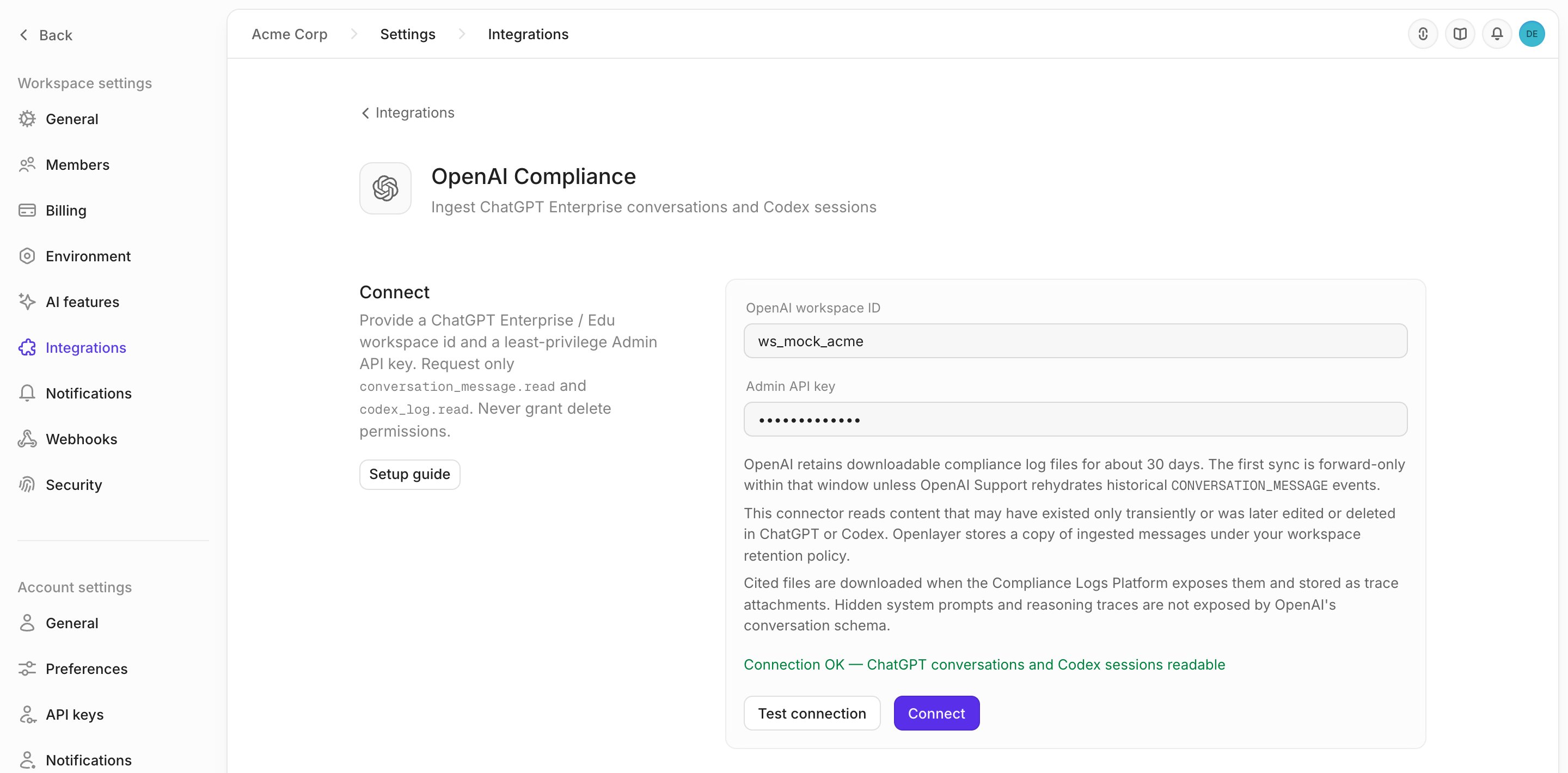 Then click **Connect**.
Openlayer validates the key against the Compliance Logs Platform before storing it, and encrypts it
at rest. If the key is rejected or the platform is unreachable, nothing is saved.
### Step 3: Enable your sources
Connecting registers two sources. Neither ingests anything until you enable it, so you can bring
ChatGPT and Codex online separately.
Click **Enable** on a source and choose where its data goes:
* **Create new project** — Openlayer creates a project and a default pipeline for the source, named
after it (`OpenAI - ChatGPT (Enterprise / Edu)`, `OpenAI - Codex`)
* **Map to existing project** — pick an existing project and pipeline instead
Enabling queues an immediate sync, so data starts arriving without waiting for the next scheduled
run.
### Step 4: Set the sync schedule
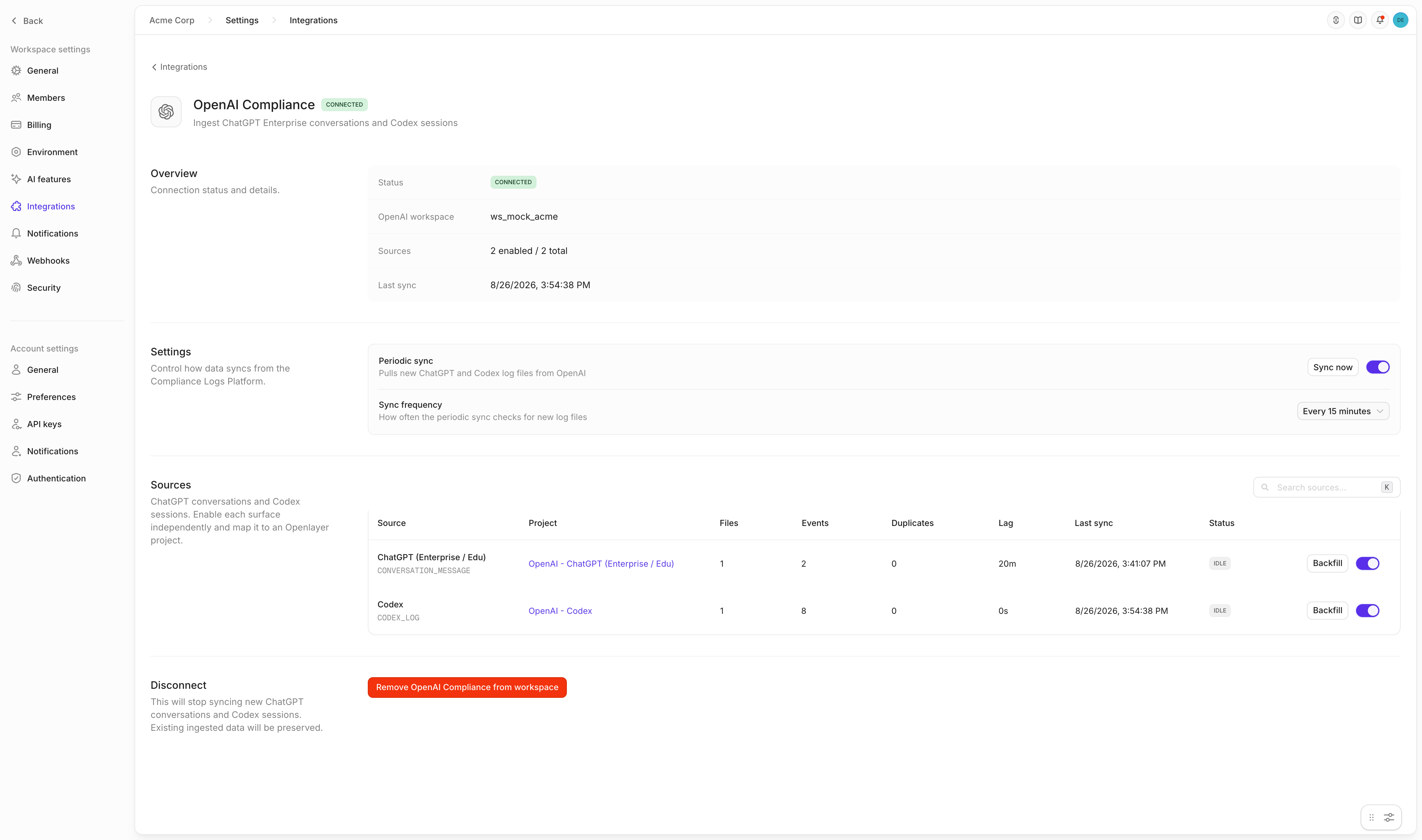
Under **Settings**, choose how often Openlayer checks for new log files: every **15 minutes**,
**30 minutes**, or **every hour**. Turn **Periodic sync** off to pause ingestion without disconnecting, or
click **Sync now** to run a tick immediately.
Then click **Connect**.
Openlayer validates the key against the Compliance Logs Platform before storing it, and encrypts it
at rest. If the key is rejected or the platform is unreachable, nothing is saved.
### Step 3: Enable your sources
Connecting registers two sources. Neither ingests anything until you enable it, so you can bring
ChatGPT and Codex online separately.
Click **Enable** on a source and choose where its data goes:
* **Create new project** — Openlayer creates a project and a default pipeline for the source, named
after it (`OpenAI - ChatGPT (Enterprise / Edu)`, `OpenAI - Codex`)
* **Map to existing project** — pick an existing project and pipeline instead
Enabling queues an immediate sync, so data starts arriving without waiting for the next scheduled
run.
### Step 4: Set the sync schedule
Under **Settings**, choose how often Openlayer checks for new log files: every **15 minutes**,
**30 minutes**, or **every hour**. Turn **Periodic sync** off to pause ingestion without disconnecting, or
click **Sync now** to run a tick immediately.
 ***
## The retention window
OpenAI keeps downloadable compliance log files for roughly **30 days**. Two consequences worth
planning around:
* **The first sync is forward-only** within that window. Activity older than the retained files is not
available to pull, and no backfill can reach it — unless OpenAI Support rehydrates historical
`CONVERSATION_MESSAGE` events for your workspace.
* **Connect before you need the data.** Once the connector is running, Openlayer holds its own copy
under your workspace retention policy, so the 30-day ceiling stops mattering for anything ingested
from that point on.
### Backfill
To re-read history a source already had access to, open the source's options menu and click
**Backfill**:
* **All available history** — re-fetch every retained log file for the source
* **Custom start date** — re-fetch from a date you pick
Backfills are safe to run at any time. Duplicate events are filtered on the way in, so re-reading
files you have already ingested adds nothing and changes nothing.
***
## What lands in Openlayer
### ChatGPT conversations
Each assistant reply becomes one row. The conversation becomes the session, so a multi-turn chat
reads as a single thread in Openlayer, and the actor's email becomes the user ID.
Alongside the prompt and response, Openlayer captures the conversation title, the custom GPT
(if one was used), the ChatGPT project, the client the user was on, whether the chat was temporary or
pinned, any tools and skills the assistant invoked, and citations.
***
## The retention window
OpenAI keeps downloadable compliance log files for roughly **30 days**. Two consequences worth
planning around:
* **The first sync is forward-only** within that window. Activity older than the retained files is not
available to pull, and no backfill can reach it — unless OpenAI Support rehydrates historical
`CONVERSATION_MESSAGE` events for your workspace.
* **Connect before you need the data.** Once the connector is running, Openlayer holds its own copy
under your workspace retention policy, so the 30-day ceiling stops mattering for anything ingested
from that point on.
### Backfill
To re-read history a source already had access to, open the source's options menu and click
**Backfill**:
* **All available history** — re-fetch every retained log file for the source
* **Custom start date** — re-fetch from a date you pick
Backfills are safe to run at any time. Duplicate events are filtered on the way in, so re-reading
files you have already ingested adds nothing and changes nothing.
***
## What lands in Openlayer
### ChatGPT conversations
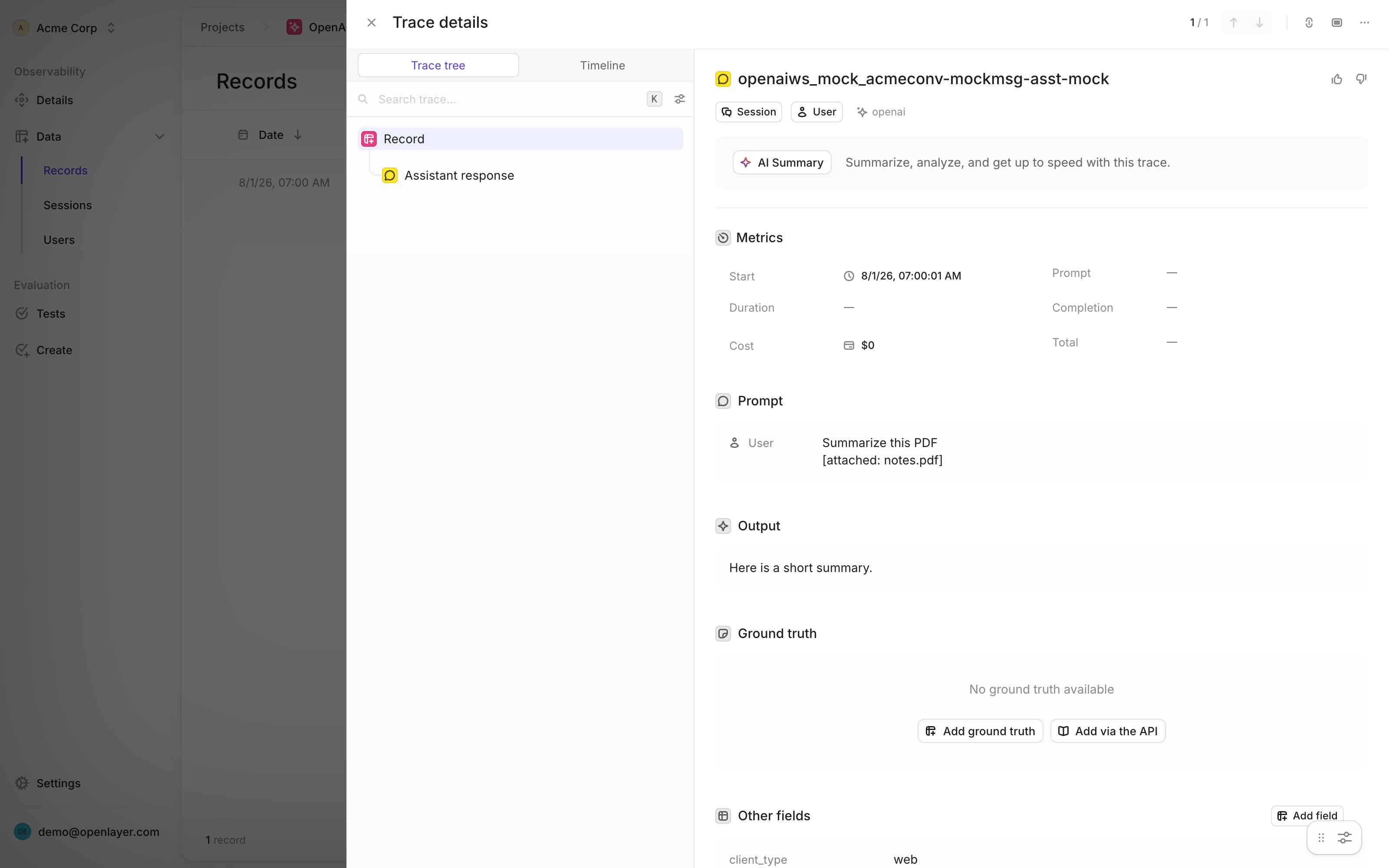
Each assistant reply becomes one row. The conversation becomes the session, so a multi-turn chat
reads as a single thread in Openlayer, and the actor's email becomes the user ID.
Alongside the prompt and response, Openlayer captures the conversation title, the custom GPT
(if one was used), the ChatGPT project, the client the user was on, whether the chat was temporary or
pinned, any tools and skills the assistant invoked, and citations.
 Cited files are downloaded when the Compliance Logs Platform exposes them and stored as session
attachments. A file that is missing, forbidden, or too large is skipped — an attachment never fails
the sync that carried it.
Hidden system prompts and reasoning traces are not part of OpenAI's
conversation schema, so they are not available to ingest.
### Codex sessions
Codex activity is correlated into turns: a prompt, the response it produced, and the tool calls in
between, all in one trace, with token counts where OpenAI reports them. Openlayer also records the
client, environment, service tier, and reasoning effort behind each turn.
Lifecycle-only events — the ones that record session bookkeeping rather than model work — are
ignored, so they do not show up as empty traces.
### Sync health
The **Sources** table is the operational view of the connector. Each row reports:
| Column | Meaning |
| -------------- | ------------------------------------------------------------------ |
| **Project** | Where this source's traces are written |
| **Files** | Log files processed |
| **Events** | Events read out of those files |
| **Duplicates** | Files and events skipped because this source had already read them |
| **Lag** | How far behind the source is against OpenAI's latest event time |
| **Last sync** | When the source last completed a tick |
| **Status** | `idle`, `error`, or `disabled` |
A steadily climbing **Lag** with a flat **Files** count means the source has stopped making progress.
A rising **Duplicates** count is not a problem — it is the source re-reading files it has already
ingested and skipping them.
A backfill *clears* what the source remembers having read, so it deliberately re-reads those files:
expect **Duplicates** to stay at zero and **Files** and **Events** to climb again. No traces are
duplicated by this — rows are deduplicated by their stable inference ID when they are written.
Cited files are downloaded when the Compliance Logs Platform exposes them and stored as session
attachments. A file that is missing, forbidden, or too large is skipped — an attachment never fails
the sync that carried it.
Hidden system prompts and reasoning traces are not part of OpenAI's
conversation schema, so they are not available to ingest.
### Codex sessions
Codex activity is correlated into turns: a prompt, the response it produced, and the tool calls in
between, all in one trace, with token counts where OpenAI reports them. Openlayer also records the
client, environment, service tier, and reasoning effort behind each turn.
Lifecycle-only events — the ones that record session bookkeeping rather than model work — are
ignored, so they do not show up as empty traces.
### Sync health
The **Sources** table is the operational view of the connector. Each row reports:
| Column | Meaning |
| -------------- | ------------------------------------------------------------------ |
| **Project** | Where this source's traces are written |
| **Files** | Log files processed |
| **Events** | Events read out of those files |
| **Duplicates** | Files and events skipped because this source had already read them |
| **Lag** | How far behind the source is against OpenAI's latest event time |
| **Last sync** | When the source last completed a tick |
| **Status** | `idle`, `error`, or `disabled` |
A steadily climbing **Lag** with a flat **Files** count means the source has stopped making progress.
A rising **Duplicates** count is not a problem — it is the source re-reading files it has already
ingested and skipping them.
A backfill *clears* what the source remembers having read, so it deliberately re-reads those files:
expect **Duplicates** to stay at zero and **Files** and **Events** to climb again. No traces are
duplicated by this — rows are deduplicated by their stable inference ID when they are written.
 ***
## Evaluating the ingested data
Once traces are flowing, everything Openlayer does with application data applies to ChatGPT and Codex
activity:
* [Create tests](/docs/tests/overview) to score response quality, safety, or tone across real employee usage
* Detect [PII](/docs/tests/catalog/contains-p-i-i) or [toxicity](/docs/tests/catalog/toxicity) in prompts and replies
* Use [governance frameworks](/docs/governance/overview) to evidence AI-usage controls with real traffic
* Track adoption, model mix, and token spend by team
***
## Disconnecting
Go to **Settings → Integrations → OpenAI Compliance** and click **Remove OpenAI Compliance from workspace**.
This stops all syncing and deletes the stored API key, the connection, and the source records. Data
already ingested — projects, pipelines, and traces — is kept. Revoke the Admin API key in OpenAI
afterwards to fully close out the access.
***
## Troubleshooting
| Symptom | Likely cause | Fix |
| -------------------------------------------------------- | -------------------------------------------------------------------- | -------------------------------------------------------------------------------------------------------------------------------- |
| Connect fails with an authentication error | The Admin API key is wrong, revoked, or belongs to another workspace | Reissue the key from the ChatGPT workspace whose ID you entered |
| Connect reports no accessible event types | The key carries neither compliance read scope | Add `conversation_message.read`, `codex_log.read`, or both, then reconnect |
| Only one source ever ingests | The key has only one of the two scopes | Expected. Add the missing scope and reconnect to enable the other source |
| A source stays at zero files after enabling | No activity in the retained window yet | Generate some ChatGPT or Codex activity and wait for the next tick, or click **Sync now** |
| **Lag** grows while **Files** stays flat | The source is erroring, or periodic sync is off | Check the source's status for an error message, and confirm **Periodic sync** is on |
| **Duplicates** jumps sharply | A backfill re-read files already ingested | Expected. Deduplication is doing its job; no traces were double-written |
| Traces have no token counts | OpenAI does not report usage for that event | Expected for ChatGPT conversation messages. Codex turns carry tokens where OpenAI reports them |
| Cited files are missing from a session | The file expired, was withheld, or exceeded the size limit | Expected. Attachments are best-effort and are skipped rather than failing the sync |
| A source errors with `Signed URL … could not be fetched` | The 307 download host is unreachable, or the signed link expired | Test connection can still pass — it never downloads a file. Confirm outbound access to OpenAI's download host, then **Sync now** |
| Nothing older than about 30 days ever arrives | OpenAI's file retention window | Not recoverable through the connector. Contact OpenAI Support about rehydrating historical events |
***
## Evaluating the ingested data
Once traces are flowing, everything Openlayer does with application data applies to ChatGPT and Codex
activity:
* [Create tests](/docs/tests/overview) to score response quality, safety, or tone across real employee usage
* Detect [PII](/docs/tests/catalog/contains-p-i-i) or [toxicity](/docs/tests/catalog/toxicity) in prompts and replies
* Use [governance frameworks](/docs/governance/overview) to evidence AI-usage controls with real traffic
* Track adoption, model mix, and token spend by team
***
## Disconnecting
Go to **Settings → Integrations → OpenAI Compliance** and click **Remove OpenAI Compliance from workspace**.
This stops all syncing and deletes the stored API key, the connection, and the source records. Data
already ingested — projects, pipelines, and traces — is kept. Revoke the Admin API key in OpenAI
afterwards to fully close out the access.
***
## Troubleshooting
| Symptom | Likely cause | Fix |
| -------------------------------------------------------- | -------------------------------------------------------------------- | -------------------------------------------------------------------------------------------------------------------------------- |
| Connect fails with an authentication error | The Admin API key is wrong, revoked, or belongs to another workspace | Reissue the key from the ChatGPT workspace whose ID you entered |
| Connect reports no accessible event types | The key carries neither compliance read scope | Add `conversation_message.read`, `codex_log.read`, or both, then reconnect |
| Only one source ever ingests | The key has only one of the two scopes | Expected. Add the missing scope and reconnect to enable the other source |
| A source stays at zero files after enabling | No activity in the retained window yet | Generate some ChatGPT or Codex activity and wait for the next tick, or click **Sync now** |
| **Lag** grows while **Files** stays flat | The source is erroring, or periodic sync is off | Check the source's status for an error message, and confirm **Periodic sync** is on |
| **Duplicates** jumps sharply | A backfill re-read files already ingested | Expected. Deduplication is doing its job; no traces were double-written |
| Traces have no token counts | OpenAI does not report usage for that event | Expected for ChatGPT conversation messages. Codex turns carry tokens where OpenAI reports them |
| Cited files are missing from a session | The file expired, was withheld, or exceeded the size limit | Expected. Attachments are best-effort and are skipped rather than failing the sync |
| A source errors with `Signed URL … could not be fetched` | The 307 download host is unreachable, or the signed link expired | Test connection can still pass — it never downloads a file. Confirm outbound access to OpenAI's download host, then **Sync now** |
| Nothing older than about 30 days ever arrives | OpenAI's file retention window | Not recoverable through the connector. Contact OpenAI Support about rehydrating historical events |